InfinityStaffing
Multi-company CRM for staffing firms

Run every staffing company you manage, in one system

Each company gets its own separate data, users and settings, and you oversee them all from one platform. Capture candidates and prospects, manage staffing requests, track every employee from hire to exit, and measure recruiting by recruiter.

36 modules Separate data per company Audit trail
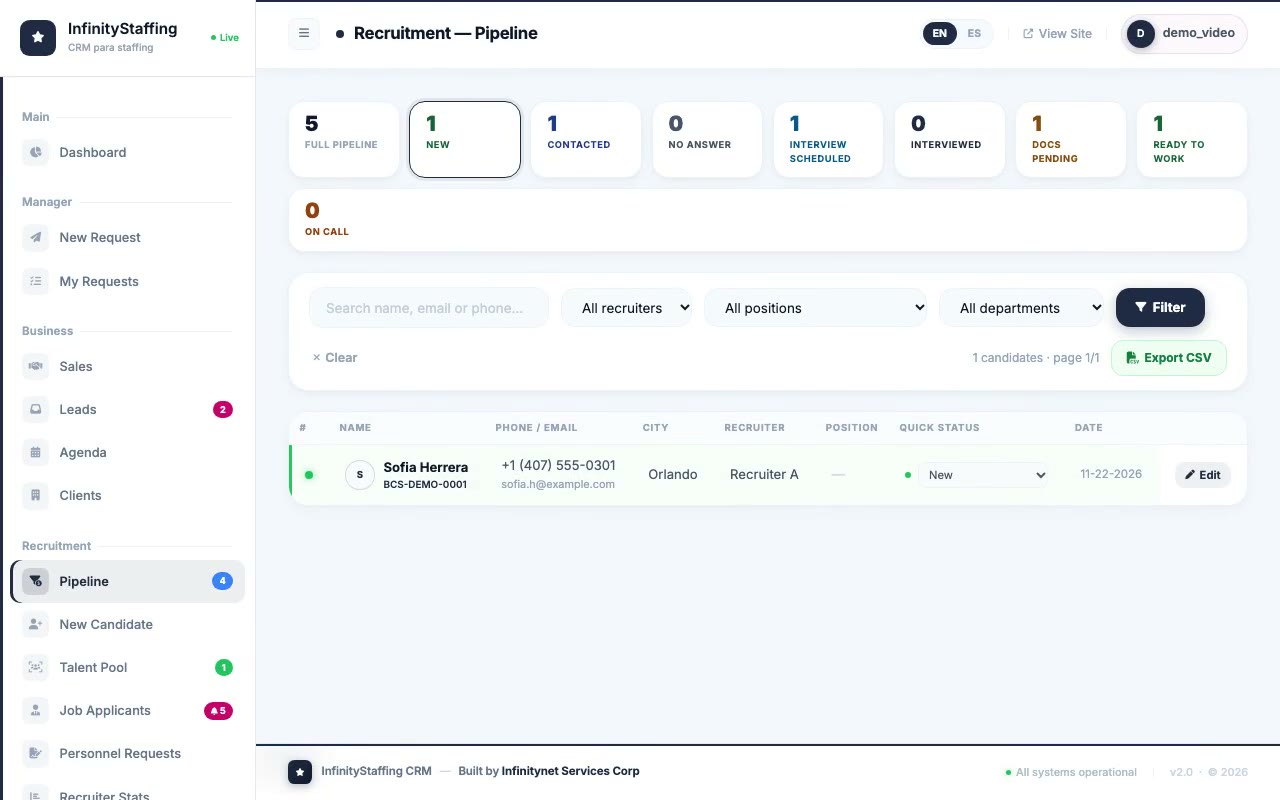
Recruiting — Pipeline
CRM screen with the candidate pipeline
Live pipelineStatus for each candidate
Intake and exitsRecords up to date
Multi-company

One platform, a separate space for each company

Add every staffing company you manage as its own company. Each one has its own data, users, roles and settings, and nothing crosses over: one company does not see another company's candidates, clients or employees.

Separate data per company

Candidates, clients, employees and documents belong to the company they were created in.

  • Each company's records are kept apart from the others
  • Documents and job letters stay with their company
  • Reports count only that company's data

Users and roles per company

Each company has its own team, with the roles and permissions its managers set.

  • Users and roles are defined inside each company
  • Each user sees only the modules their role allows
  • Each company keeps its own settings

One platform for all of them

You run every company from the same system, with the same modules and the same audit trail.

  • The same modules for every company you manage
  • Audit trail of every action, in each company
  • One system to operate and measure all of them
What it does

From first contact to exit, in one place

InfinityStaffing replaces spreadsheets, scattered emails and paper forms with one workflow. Every candidate, client and employee has a record in the database, and every change is logged in the company it belongs to.

Capture

Candidates and prospects reach the CRM directly, without emails or manual entry.

  • Public forms and QR links
  • Web leads with campaign source
  • Bulk import of candidates and sales

Recruiting pipeline

Each candidate moves through clear stages, with an owner and notes.

  • Statuses: new, contacted, interview, documents, ready
  • Talent pool to reuse candidates
  • Filters by recruiter, position and department

Clients and sales

Prospects, clients and the follow-up calendar, from the first call.

  • Prospects with status and follow-up
  • Clients with location, service type and positions
  • Shared team calendar

Operations

Intake, assignment and exit of every employee, with full history.

  • Staff intake with signed packet
  • Assignments between clients and positions
  • Exits, complaints, incidents and time off

Compliance and documents

Documents and history stay organized for audits and daily work.

  • Master list with each employee record
  • Job letters with verification code
  • Audit trail of every action

Reports and control

Business numbers by recruiter and by client, without building reports by hand.

  • Statistics by recruiter
  • Dashboard with the last 7 days of activity
  • CSV export of every list
Walkthroughs

How the system is used

Three short walkthroughs of the CRM areas, with demo data.

What the system does

A tour of the whole CRM, from first contact to exit.

Recruiting from start to finish

Candidate pipeline, statuses, applicants and the talent pool.

Sales and clients

Web leads, prospects, clients and the follow-up calendar.

Operations and exits

Master list, staff intake, exits, complaints and reports.

Catalog

36 modules, organized by area

Each company has its own users and roles. Within each company, every user sees only what their role allows, and every action is recorded.

Available to add

Add-on modules, charged per integration

Each module is charged separately and integrates into the same system as the CRM, under the same rules for every company.

Response time

Faster answers for your team, with everything in the database

These are the processes where staffing teams usually lose the most hours. The figures come from a real operation; each company should measure its own times.

Response times

Where the hours go, and how much comes back.

Real example from a staffing operation. System volumes in production, monthly average from September to November 2026. The "before" minutes are work assumptions, not measurements.

ProcessCases/monthBeforeWith the CRMSaved/month
Staff intake packets
Paper, scan and copy to Excel
3645 min10 min21 h
Sales visits logged
Wufoo + Excel + finding follow-ups
2005 min2 min10 h
Daily sales follow-up list
Checked by hand in a sheet
22 days10 min/dayAutomatic, 7 am email7 h
Daily recruiting list
Calls, follow-ups and interviews built by hand
22 days20 min/dayAutomatic, 7 am email7 h
Active / Inactive reports
Pivot table in Excel
460 min1 min4 h
Staff exits
Read Wufoo, search, notify
2210 min1 min3 h
Staffing requests from clients
Email or phone call
1515 min5 min2.5 h
Master list entry
Typing the employee into Excel
1210 min1 min2 h
Job letters
Drafting the letter in Word
320 min3 min1 h
Employee complaints
WhatsApp or call, no follow-up
420 min7 min1 h
Estimated total≈ 59 h

Conservative scenario: about 30 hours a month, if the old times were half of what we assumed. That is about 35% of a full-time job.

Who it is for

Each area sees what it needs, in each company

Roles and permissions decide which modules each person sees, inside their own company. Nobody sees more than they should.

Recruiting

Pipeline, applicants, talent pool and team statistics.

Sales

Web leads, prospects, clients and the follow-up calendar.

Operations

Intake, assignments, exits, complaints and time off for staff.

Management

Control panel, reports and the audit trail for the whole team.

How much time you save

Calculate the savings with your own numbers

Enter how many candidates you process each month and how long each one takes you today. The result updates as you type.

Example. Use your real number.
Sourcing, follow-up, documents.
Estimate. Adjust with your team.
0
hours per month the team gets back
Minutes saved per candidate0
Hours per person per month0
Equivalent workdays0

Estimate based only on the numbers you enter. It is not a guarantee of results.

Flow

How it works

01

Capture

Public forms and QR links send candidates and requests straight into the CRM of the company they apply to, with their data and documents.

02

Manage

Every candidate and staffing request moves through the pipeline, with statuses, notes and owners.

03

Operate and measure

Intake, exits, complaints and statistics by recruiter, with an audit trail.

Corporate email

Your corporate email on your own domain

We set up and configure your company email on your own domain (name@yourcompany.com), with the provider your company chooses: Google Workspace, Microsoft 365 or Zoho Mail.

  • ✓ Domain and mailboxes set up for your team
  • ✓ DNS records (SPF, DKIM, DMARC) created and verified
  • ✓ System notifications sent from your company address
  • ✓ Support during setup and handover

Let's see it with your companies

Tell us about the staffing companies you manage and we will schedule a demo with your operation.